Organize Your Culinary Creations with the Recipe Book Template for Canva
There is a specific kind of satisfaction that comes from a perfectly curated collection of recipes. Whether it is a stack of handwritten cards from your grandmother, a folder of digital clippings, or your own experimental creations, these culinary notes deserve a better home than a messy drawer or a disorganized desktop. If you have been meaning to compile these treasures, the Recipe Book Template for Canva offers a practical and elegant solution. It is a digital design asset built for creators who want the look of a professionally published cookbook without the overhead of complex layout software.
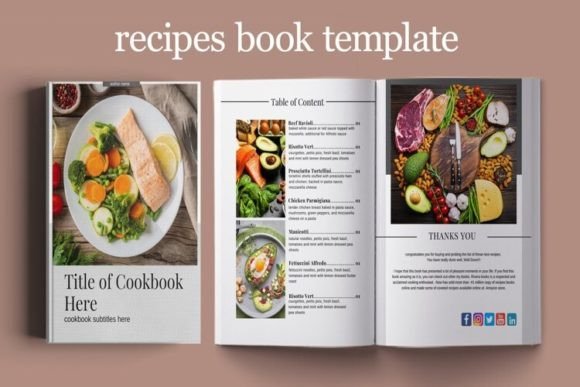
Designed for use in Canva, this template set is immediately accessible. You do not need a subscription to Adobe InDesign or years of editorial design experience to use it. The visual style leans towards a clean, modern aesthetic that lets the food and the story behind it take center stage. The layout balances generous white space with structured grids for text and images, creating a rhythm that is easy for the eye to follow. It feels personal yet polished, making it suitable for both a family heirloom and a small business product.
A Practical Blueprint for Print and Digital Publishing
One of the strongest aspects of this template is its dual-purpose nature. It is structured around a US Letter (8.5" by 11") size, which is the standard for home printing and many professional print-on-demand services. This means you can design your book digitally and have it printed as a physical object, perfect for gifts or sale. At the same time, the file is optimized to be saved as a PDF or flipped as an ebook, giving you a digital product to sell on your blog or distribute to your audience.
The package includes 12 ebook page templates, which serve as a flexible foundation. It is not just a collection of blank pages; it is a structured guide that accounts for the different types of content a cookbook requires. The inclusion of 2 cover templates allows you to set a strong first impression. You will also find 2 content pages, 2 about the author pages, and specific recipe pages designed to handle ingredients and instructions clearly. For those who are planning a lifestyle brand or a health-focused publication, the addition of a My Weekly Meal Plan and a My Daily Diet page adds significant functional value, turning the book into a usable planner as well.
Full Creative Control Without the Learning Curve
Flexibility is key when working with templates. A rigid design can stifle creativity, but this template is built to be changed. The prompt "What can you customise?" is answered simply: everything. You have full control over all text, meaning you can adapt the language to fit your specific voice, whether it is casual and conversational or professional and instructional.
Typography is often a sticking point in DIY design, but here it is fluid. You can change all fonts to match your existing brand identity or personal taste. If you prefer a serif font for a classic, traditional cookbook feel, you can swap it in. If you are aiming for a modern typography look with a sans serif font, that is equally simple. The ability to change all photos is a given, but the structural flexibility is what makes this a premium asset. You can add, copy, delete or rearrange pages. If you have more recipes than the initial 12 pages allow, simply duplicate the recipe layout page. If you do not need the meal planner, delete it. This modularity ensures the template grows with your project.
Applications Across Industries and Hobbies
While the primary use case is personal recipe organization, the applications for entrepreneurs and marketers are broad. For small business owners in the food industry, this template is a quick way to produce a lead magnet. A bakery or a meal prep service could offer a free "Top 10 Seasonal Recipes" ebook to grow their email list. The professional layout helps build trust and authority, which is a core component of E-E-A-T (Experience, Expertise, Authoritativeness, and Trustworthiness) in digital marketing.
Bloggers and content creators can use this to monetize their archives. Instead of leaving recipes buried in blog posts, they can compile them into a downloadable product. The visual hierarchy of the template ensures that the content is scannable. Good editorial design guides the reader's eye from the title to the image, to the ingredients, and finally to the method. This improves readability and user experience, which are critical factors for audience engagement.
For crafters and hobbyists, this is a tool for preservation. Family recipes are often written on scraps of paper that fade over time. Digitizing them into a structured format like this preserves them for future generations. It allows you to add context, stories, and high-quality photos that paper cards cannot hold. It transforms a simple list of instructions into a narrative about family history and tradition.
Design Considerations and Visual Hierarchy
When customizing the Recipe Book Template for Canva, pay attention to visual hierarchy. The template provides the structure, but the content must be curated. Avoid the temptation to overcrowd pages. If a recipe requires a long introduction, use the content pages provided to tell that story separately from the technical instructions. This separation helps the reader navigate the book whether they are reading it cover to cover or just looking for a quick dinner idea.
Consider the font pairing possibilities. The template likely comes with a suggested pairing, but you can experiment. A common strategy in brand identity and packaging design is to use a display font or a script font for titles to add personality, paired with a highly legible sans serif font for the body text. This ensures the book looks stylish but remains functional. Readability is paramount in a cookbook; if the measurements are hard to read, the book fails at its primary job.
Color is another lever you can pull. The template likely uses a neutral palette to accommodate various food photography styles. You can maintain this for a clean, minimalist look, or introduce brand colors in headers and footers to create consistency with your other design assets. However, ensure that text contrast remains high. A light grey text on a white background might look chic, but it can be frustrating to read in a dim kitchen.
A Tool for Publication and Legacy
Ultimately, the Recipe Book Template for Canva bridges the gap between a collection of ideas and a finished publication. It removes the technical barriers to editorial design. You do not need to understand grid systems, master pages, or typographic leading to create something that looks put-together. The template handles the structural "bones" of the design, allowing you to focus on the content—the recipes themselves.
Whether you are planning to sell a digital ebook, print a hardcover for a family reunion, or simply create a personal digital archive, this template provides the framework. It is a versatile creative font and layout solution that adapts to the scale of your ambition. By utilizing the customization options to their fullest, you can produce a cookbook that is not only useful in the kitchen but also a piece of modern typography that you are proud to share. It is a practical application of design principles, resulting in a tangible product that holds both functional and sentimental value.