The Ultimate Small Business Planner: A Canva Template for Your Success
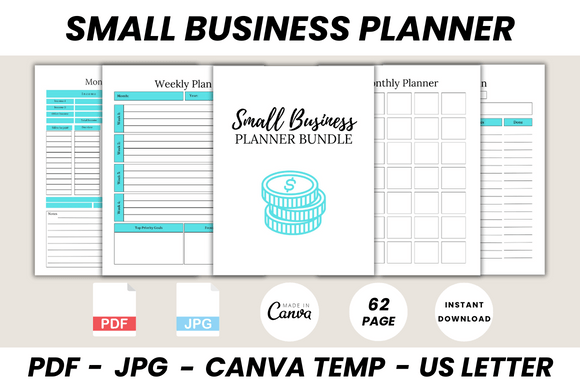
Running a small business often feels like juggling a dozen tasks at once, from inventory checks to social media scheduling. Finding a system that keeps everything organized without requiring expensive software is a game-changer. This is where the Small Business Planner Canva Template steps in. It is not just a collection of pages; it is a comprehensive operational toolkit designed for the modern entrepreneur who values both aesthetics and functionality. With 62 printable pages, this template serves as the central nervous system for your brand, ensuring that nothing falls through the cracks.
Visual Style and Practical Appeal
Unlike generic spreadsheets that feel cold and corporate, this Small Business Planner Canva Template embraces a clean, modern aesthetic. The design prioritizes readability and white space, allowing your eyes to rest even when reviewing complex data like Annual Finance or Profit & Loss Trackers. The visual personality is professional yet approachable. It uses a balanced mix of structure and flexibility, utilizing modern typography that makes scanning for information quick and effortless. The overall appeal lies in its versatility; whether you are a crafter selling on Etsy or a consultant managing clients, the layout adapts to your workflow rather than forcing you into a rigid box.
The template includes critical sections that cover the entire business lifecycle. You will find dedicated pages for Daily Planning, Weekly Reviews, and Monthly Overviews. However, the real strength lies in the specialized sheets. For product-based businesses, the New Product Planner, Packaging Planner, and Inventory Log are indispensable. For service providers, the Customer Follow Up List and Important Meeting To-Do pages ensure client relationships are nurtured. It even covers the creative side with a Social Media Planner, Facebook Post Planner, and Campaign Manager, bridging the gap between operations and marketing.
How This Template Influences Your Brand Identity
A well-organized business projects professionalism, and this planner is a tool to help you achieve that consistency. When you use the Campaign Tracker or Advertisement Tracker to plan your launches, you are building a brand identity rooted in reliability. The visual hierarchy of the pages guides your attention to what matters most—whether it is checking your Monthly Budget or setting new goals using the Goals Action Plan.
For those in digital marketing or content creation, the inclusion of a Hashtag Research sheet and Online Statistics tracker is vital. These elements allow you to maintain a data-driven approach to your social media graphics and editorial design. By keeping your strategies documented, you ensure that your messaging remains consistent across all platforms. The planner acts as a design asset for your business life, providing a structured framework that supports creative thinking without the chaos of disorganization.
Practical Application: From Inventory to Invoicing
Let’s look at how this fits into a real-world scenario. Imagine you are launching a new line of handmade candles. You would start with the New Product List to brainstorm ideas, move to the Product Evaluation page to test concepts, and then use the Packaging Planner to finalize the look. Once live, the Order Form and Order Tracker keep your shipping on schedule. Simultaneously, the Invoice and Sales Tracker pages ensure your finances are in order.
The template also addresses the backend necessities that often get overlooked. The Password Tracker and Contact List are small but crucial details for security and networking. The Habit Tracker is a unique addition, acknowledging that business success is often tied to the founder's personal discipline. Furthermore, the Seasonal Idea Improvement Planner helps you prepare for holidays and trends well in advance, giving you a strategic edge in the market.
Getting Started and Customization
One of the biggest advantages of a Small Business Planner Canva Template is the ease of use. You do not need to be a graphic design expert to make it yours. All you need is a free Canva account. Once you access the file, you can edit text, change colors to match your specific brand identity, and even add your own logo to the Belongs To page.
Because the template is editable, it functions like a premium font or a high-end design asset—it provides a professional starting point that you can customize. You can duplicate pages if you have multiple product lines or delete sections that don't apply to your current stage. Whether you prefer to view it digitally on your screen or print it out for a tactile planning session, the layout is optimized for both. It is a robust solution for anyone looking to elevate their business management from chaotic to composed.